
Introduction
Search Engine Optimization (SEO) is one of the most effective ways to generate consistent organic traffic to your website. However, ranking on search engines like Google has become increasingly competitive. Millions of websites compete for the same keywords, making it difficult for new websites and small businesses to achieve top rankings.
This is where low-competition keywords become valuable.
Low-competition keywords are search terms that have relatively fewer websites targeting them. Because there is less competition, these keywords provide an excellent opportunity to rank higher in search engine results pages (SERPs), attract targeted visitors, and increase conversions without investing heavily in advertising.
Whether you are a blogger, affiliate marketer, eCommerce store owner, freelancer, or digital marketing professional, learning how to find low-competition keywords can dramatically improve your SEO strategy.
In this comprehensive guide, you’ll learn everything about low-competition keywords, why they matter, and the most effective methods for finding them.
What Are Low-Competition Keywords?
Low-competition keywords are search terms that have fewer websites actively competing for rankings in search engine results.
These keywords generally have:
- Lower SEO difficulty
- Fewer backlinks required to rank
- Less authoritative competitors
- Higher ranking potential for newer websites
For example:
High Competition Keyword:
- SEO Tools
Low Competition Keyword:
- Best SEO tools for beginner bloggers
The second keyword is more specific and targeted, making it easier to rank for
 SEO
SEO
KR Krishna Kushwaha| Jun 02, 2026| 8 min read
Complete On-Page SEO Checklist
Why Low-Competition Keywords Matter
Many website owners make the mistake of targeting only high-volume keywords. While these keywords may generate significant traffic, ranking for them often requires years of SEO work.
Low-competition keywords offer several advantages:
Faster Rankings
Since fewer websites compete for these terms, your content can rank more quickly.
Better Conversion Rates
Specific keywords often indicate stronger user intent.
For example:
- “Laptop” → Broad search
- “Best laptop under $700 for students” → Buying intent
The second keyword is much more likely to convert.
Ideal for New Websites
New domains usually lack authority and backlinks.
Low-competition keywords provide an easier path to visibility.
More Organic Traffic Opportunities
Instead of targeting one difficult keyword, you can rank for hundreds of easier keywords and collectively generate substantial traffic.
 SEO
SEO
KR Krishna Kushwaha| Jun 02, 2026| 8 min read
On-Page SEO Topics
Understanding Keyword Competition
Keyword competition measures how difficult it is to rank for a specific keyword.
Several factors affect competition:
Domain Authority
Strong websites dominate competitive keywords.
Examples include:
- Wikipedia
- Forbes
- HubSpot
- Amazon
Backlink Profile
Pages with many quality backlinks are harder to outrank.
Content Quality
Comprehensive and optimized content performs better.
Search Intent Alignment
Google prioritizes pages that best match user intent.
 SEO
SEO
KR Krishna Kushwaha| Jun 03, 2026| 12 min read
Keyword Research: The Complete Guide to Finding High-Traffic, Low-Competition Keywords
Types of Low-Competition Keywords
Long-Tail Keywords
Long-tail keywords contain three or more words.
Examples:
- Best gaming laptop under 1000 dollars
- How to start a travel blog in 2025
Benefits:
- Lower competition
- Higher conversions
- Easier ranking opportunities
 SEO
SEO
KR Krishna Kushwaha| Jun 03, 2026| 11 min read
Content Optimization Techniques: The Complete Guide to Maximizing Visibility, Engagement, and Conversions
Question Keywords
People frequently search questions.
Examples:
- How does SEO work?
- What is keyword cannibalization?
These often have lower competition.
 SEO
SEO
KR Krishna Kushwaha| Jun 03, 2026| 12 min read
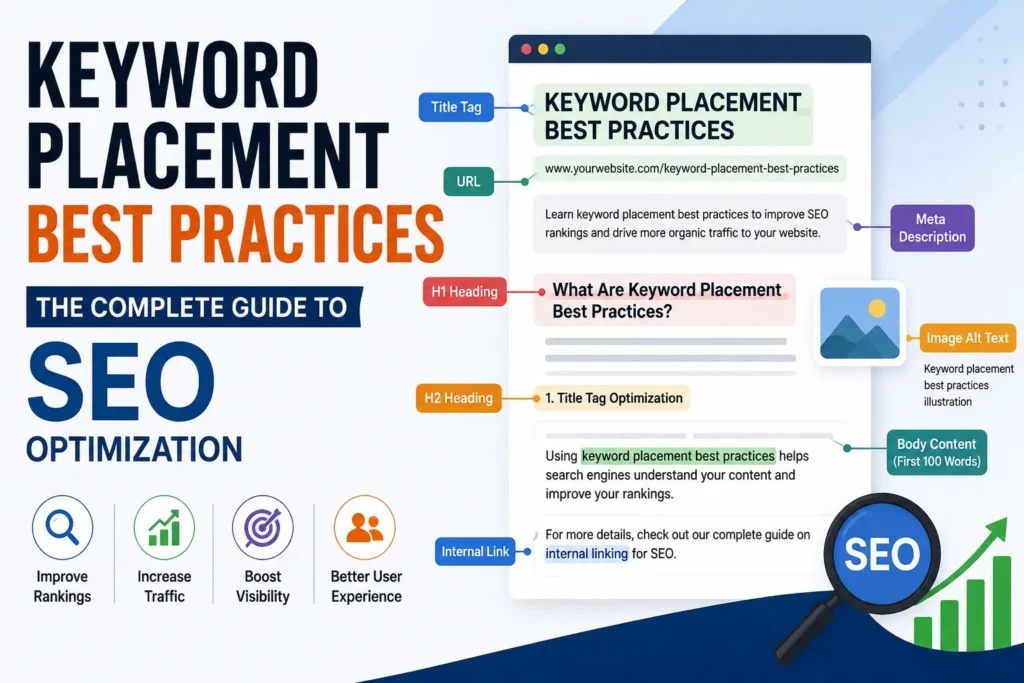
Keyword Placement Best Practices: The Complete Guide to SEO Optimization
Local Keywords
Local SEO keywords target specific locations.
Examples:
- Dentist in Chicago
- Best restaurant in Mumbai
Local keywords often have less competition than national terms.
Product-Specific Keywords
Examples:
- iPhone 16 Pro Max review
- Samsung Galaxy camera settings
These keywords target users closer to purchasing decisions.
How to Find Low-Competition Keywords
Use Google Autocomplete
Google’s autocomplete feature provides valuable keyword ideas.
Simply start typing a keyword and observe suggested searches.
Example:
Typing:
“email marketing”
May show:
- email marketing for beginners
- email marketing strategies
- email marketing tools
These suggestions come directly from real user searches.
Explore Google Related Searches
Scroll to the bottom of Google search results.
You’ll find related searches.
These suggestions often reveal:
- Long-tail keywords
- User intent
- Content opportunities
Use Google’s People Also Ask Section
The People Also Ask (PAA) box is a goldmine.
Examples:
- How long does SEO take?
- Is SEO worth it in 2025?
Creating content around these questions can generate targeted traffic.
Find Keywords with Keyword Research Tools
Google Keyword Planner
Google Keyword Planner provides:
- Search volume
- Competition level
- Keyword suggestions
Although designed for advertisers, it’s useful for SEO research.
Ahrefs
Ahrefs is one of the most powerful keyword research tools.
Features include:
- Keyword Difficulty score
- Search volume
- Parent topics
- Competitor analysis
Look for keywords with:
- KD under 20
- Decent search volume
SEMrush
SEMrush provides:
- Keyword difficulty
- Search trends
- Competitor insights
Use the Keyword Magic Tool to discover hidden opportunities.
Ubersuggest
Ubersuggest is beginner-friendly.
It shows:
- SEO difficulty
- Paid difficulty
- Search volume
- Content ideas
KeywordTool.io
KeywordTool.io expands Google autocomplete suggestions.
This helps uncover hundreds of low-competition long-tail keywords.
Analyze Competitor Keywords
Competitor analysis is one of the fastest ways to find keyword opportunities.
Step 1
Identify competitors in your niche.
Step 2
Enter their website into Ahrefs or SEMrush.
Step 3
View keywords they rank for.
Step 4
Filter by:
- Low keyword difficulty
- Medium search volume
You’ll discover opportunities your competitors may be overlooking.
Look for Search Intent Gaps
Search intent matters more than ever.
Four major types include:
Informational
Users want information.
Example:
- What is SEO
Navigational
Users seek a specific website.
Example:
- Facebook login
Commercial
Users compare options.
Example:
- Best SEO tools
Transactional
Users are ready to buy.
Example:
- Buy SEO course online
Targeting low-competition keywords with clear intent increases success rates.
Use Forums and Communities
Forums reveal what real users are searching for.
Great sources include:
- Quora
- Niche forums
- Facebook Groups
Look for recurring questions.
Turn those questions into content topics.
Leverage YouTube Search Suggestions
YouTube suggestions reveal trending topics.
For example:
Typing:
“SEO for”
May reveal:
- SEO for beginners
- SEO for blogs
- SEO for eCommerce
Many YouTube keywords work well for blog content.
Find Keywords Through Google Search Console
If your website already receives traffic, Search Console is invaluable.
Review:
- Queries
- Impressions
- Clicks
- Average positions
Look for keywords ranking between positions 8 and 20.
These keywords often require minor optimization to reach page one.
Evaluate Keyword Difficulty
Finding keywords isn’t enough.
You must evaluate their ranking potential.
Check:
Domain Authority of Top Results
Can you realistically compete?
Backlinks
How many backlinks do ranking pages have?
Content Quality
Can you create something better?
Search Intent
Does your content match user expectations?
Ideal Metrics for Low-Competition Keywords
For newer websites, target:
- Keyword Difficulty: 0–20
- Search Volume: 50–1000+
- Long-tail format
- Clear user intent
This combination often provides the best opportunity.
Create Content Around Keyword Clusters
Instead of targeting one keyword per article, create keyword clusters.
Example:
Primary Keyword:
- Low competition keywords
Supporting Keywords:
- easy keywords to rank for
- keyword difficulty
- long-tail keywords
- keyword research techniques
This improves topical authority.
Common Mistakes to Avoid
Targeting Search Volume Only
High search volume doesn’t guarantee success.
Competition matters.
Ignoring Search Intent
Traffic without intent rarely converts.
Keyword Stuffing
Overusing keywords harms readability and rankings.
Not Analyzing SERPs
Always review the top-ranking pages.
Chasing Highly Competitive Keywords
Focus on realistic opportunities first.
Best Workflow for Finding Low-Competition Keywords
- Start with a broad topic.
- Use Google Autocomplete.
- Gather related searches.
- Analyze competitors.
- Check keyword difficulty.
- Evaluate search intent.
- Create keyword clusters.
- Publish high-quality content.
- Build internal links.
- Monitor rankings.
Following this process consistently can produce hundreds of ranking opportunities.
Advanced Low-Competition Keyword Strategies
Target Emerging Trends
Use:
- Google Trends
- Industry news
- Social media discussions
Being early reduces competition.
Use Alphabet Soup Method
Type a keyword followed by:
A, B, C, D, etc.
Example:
“SEO tools a”
“SEO tools b”
This reveals additional keyword ideas.
Analyze Weak SERPs
Look for results with:
- Low authority domains
- Thin content
- Forum pages
These indicate ranking opportunities.
Create Comprehensive Content
Long-form content often ranks better.
Aim for:
- Detailed explanations
- Examples
- FAQs
- Visuals
- Internal links
Measuring Success
Track:
Organic Traffic
Monitor growth in analytics.
Rankings
Use rank tracking tools.
Click-Through Rate
Improve titles and meta descriptions.
Conversions
Traffic should support business goals.
Future of Low-Competition Keyword Research
As AI-generated content grows, search engines increasingly reward:
- Expertise
- Experience
- Original insights
- Helpful content
Keyword research remains important, but content quality will play an even bigger role.
Websites that combine low-competition keyword targeting with exceptional content will continue to succeed.
Conclusion
Finding low-competition keywords is one of the smartest SEO strategies available today. Rather than battling established websites for highly competitive terms, you can target specific, easier-to-rank keywords that generate qualified traffic and conversions.
The process involves understanding search intent, analyzing keyword difficulty, researching competitors, using keyword tools, and creating valuable content around keyword clusters.
Whether you’re launching a new blog, growing an affiliate website, or improving a business website, low-competition keywords provide the foundation for sustainable organic growth.
Start by identifying long-tail opportunities, evaluate competition carefully, and consistently publish high-quality content. Over time, these rankings will compound into significant traffic and revenue growth.
FAQs
Low-competition keywords are search terms that have fewer websites actively competing for top positions in search engine results. These keywords are generally easier to rank for compared to highly competitive keywords because they often have lower keyword difficulty scores, fewer backlinks pointing to ranking pages, and less competition from authoritative websites. Low-competition keywords are especially useful for new websites, blogs, and small businesses that want to increase organic traffic without competing directly with major brands. By targeting these keywords, website owners can achieve faster rankings and attract highly targeted visitors who are more likely to engage with their content or make a purchase.
You can find low-competition keywords using several methods. Start with Google Autocomplete, People Also Ask sections, and Related Searches to discover keyword ideas directly from user searches. Keyword research tools such as Google Keyword Planner, Ahrefs, SEMrush, Ubersuggest, and KeywordTool.io can help identify keywords with low difficulty scores and decent search volume. Competitor analysis is another effective strategy, as it allows you to find keywords that competing websites rank for but are not heavily contested. Combining these methods can help you build a strong list of low-competition keywords for your content strategy.
Not always, but many long-tail keywords tend to have lower competition than short, broad keywords. Long-tail keywords are more specific search phrases, usually containing three or more words. For example, “SEO” is highly competitive, while “best SEO tools for beginner bloggers” is more specific and often easier to rank for. However, some long-tail keywords in popular industries can still be competitive. It is important to evaluate search volume, keyword difficulty, and existing search results before deciding whether a keyword is truly low competition
Low-competition keywords are important because they offer a realistic opportunity for websites to rank in search engines and attract organic traffic. New websites often struggle to compete against established domains targeting high-volume keywords. By focusing on easier keywords, website owners can gain visibility, build authority, and generate traffic more quickly. Additionally, low-competition keywords often have clear user intent, which can lead to higher conversion rates. Over time, ranking for many low-competition keywords can create a steady stream of targeted visitors and improve overall website performance.
For beginners and newer websites, it is generally recommended to target keywords with a difficulty score between 0 and 20. These keywords typically require fewer backlinks and less domain authority to rank successfully. As your website grows and gains authority, you can gradually target more competitive keywords. However, keyword difficulty should not be the only factor you consider. Search intent, content quality, relevance, and competitor strength also play important roles in determining your ability to rank well in search results.
Leave a Reply